



One of the great things about having an AI homeschool agent, is how it can work with external tools to foment education. We do this with our homeschool agent Charlotte and our daughter's tablet lock screen in lots of ways, and it's the idea behind a new feature that I recently added to Charlotte's toolkit. There are lots of great external tools that already exist in education. Even though some of these tools have been around for a long time, agents can build workflows around them that magnify their usefulness and make them feel magical. Though this is certainly the case with MindFeast, that was designed to work with agents, it's also the case with other tools.
One such tool is the fantastic artist and composer rotations at AmblesideOnline (AO). These pages follow the great artists and composers according to a schedule that maps to a school year. The idea is that practitioners of Charlotte Mason education can follow these greats at the same time, giving them a sense of community, so they can share resources and help each other while they educate their children. The rotations are used for picture and composer studies which are common to Charlotte Mason and other systems of education.
How can an AI agent help?
In the past, we've normally just gone to these masterpieces online and done the picture studies by looking at the images quietly or listening to the music, and talking about it. In some cases we've sat in front of a computer screen and read about them together, or asked AI to tell us more. One thing I've liked to do, is have my daughter ask AI questions about the artwork and have the AI answer at her comprehension level. All of these techniques are fine, as is using printed materials and books, and doing the entire thing offline. But I wanted to do something more and I wanted to streamline it.
So, I created a picture study skill and a composer study skill that allows Charlotte to gather the artwork, research the piece, create a mini "podcast", and put it all together as a slide for my daughter's tablet lock screen. Charlotte then pushes the new slide to the tablet and selects it to display next. She does this in the middle of the night before we do the studies. In our home we alternate weeks between picture and composer studies. When my daughter wakes up, the study is ready and waiting.
A picture study is just the painting with an audio player. Normally, my daughter looks at the painting on her own and makes her own observations about it. After some time of quiet reflection, we listen to the podcast, which focuses more on narrative and historical details about the artist, rather than interpretation of the work.
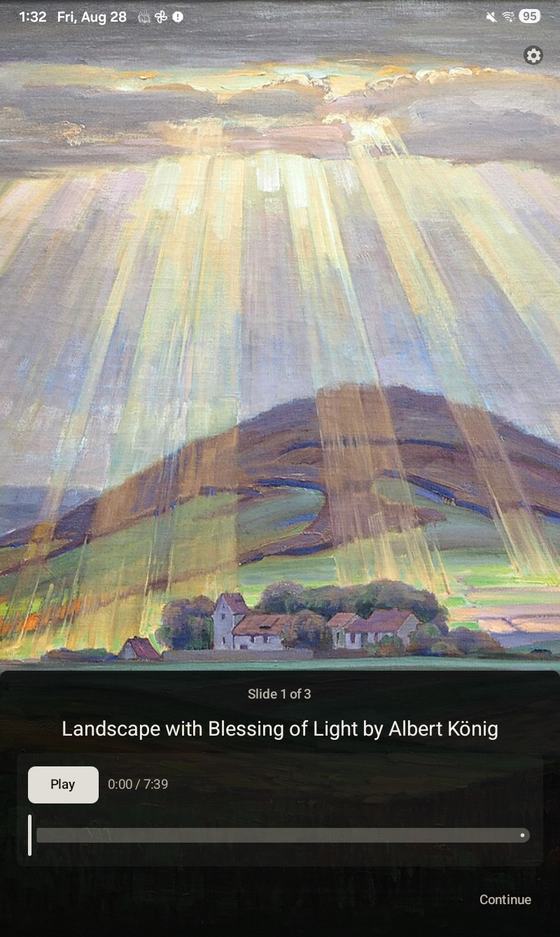
A composer study is the same as the picture study, however, it comes with two slides. The first slide is the work itself, which is the music to listen to. To make it visually interesting Charlotte creates an image background using our configured aesthetics so it looks the way we like. For this slide, we just listen to the music and my daughter makes her observations. The second composer slide is a podcast about the composer and the work. Just like the first slide, Charlotte creates an appropriate image. We normally listen to the podcast later in the week.
Since Charlotte is a capable agent and the Ambleside Online rotations stick with the same artists and composers for a term, Charlotte is able to keep track of where we are in the rotation. Because of this, she's able to produce a longer and more general podcast about an artist the first time he is introduced and a more targeted podcast about the artist and an individual work when the study is for another piece from the same artist.
The way it works is generally like this:
- Charlotte goes to the AO artist or composer rotation web page to see what's next.
- She downloads the image or audio file from WikiMedia Commons or another location.
- She does cursory research by searching on Grokipedia and Wikipedia to generate leads and ideas.
- She does more substantial research by searching on museum pages and historical websites.
- She writes a transcript based on her findings and uses text to voice to create a podcast.
- She uses the MindFeast slide builder, MindFeast slide sync, and MindFeast slide trigger skills to push the new content to my daughters tablet and select it.
- She also leaves a manifest file with the transcript and citations for all the sources she used to create the podcast, so that I can easily audit for quality.
All we do is wake up in the morning and do our picture or composer study. Charlotte knows when we need them and she makes sure we get them.
Of course, AmblesideOnline doesn't need all of this to work, nor does MindFeast, however, when you stitch these things together, you can create educational workflows that feel truly magical. This is what we're doing at the moment, and it's working well for us.